Wednesday, March 12, 2014

Convert list to string Scenario

       Dim dests As String = ""
        Dim seprateDests As String = ""
        Dim selectedCountries As List(Of String) = objData.Destination.Split(" ").ToList()
        For Each country In selectedCountries
            dests = country.Split(",")(1).ToString()
            seprateDests += dests.Replace("-", " ") + ","
        Next

----------------------------------
List<string> dogs = new List<string>(); // Create new list of strings
 dogs.Add("Aigi"); // Add string 1
 dogs.Add("Spitz"); // 2
 dogs.Add("Mastiff"); // 3
 dogs.Add("Finnish Spitz"); // 4
 dogs.Add("Briard"); // 5

 string dogCsv = string.Join(",", dogs.ToArray());
 Console.WriteLine(dogCsv);

Wednesday, February 5, 2014

MVVM Pattern


MVVM is an architectural pattern with the focus of removing UI cluttered code. It does the same by using an extra class called as view model. MVVM is mostly suitable for Silverlight and WPF projects because of the rich bindings provided by the technologies.


http://msdn.microsoft.com/en-us/magazine/dd419663.aspx

http://joel.inpointform.net/software-development/mvvm-vs-mvp-vs-mvc-the-differences-explained/

Sunday, January 12, 2014

Model Binder in MVC

  Model Binder in MVC:
    http://msdn.microsoft.com/en-us/library/dd410405%28v=vs.100%29.aspx

"A model binder in MVC provides a simple way to map posted form values to a .NET Framework type and pass the type to an action method as a parameter. Binders also give you control over the deserialization of types that are passed to action methods. Model binders are like type converters, because they can convert HTTP requests into objects that are passed to an action method. However, they also have information about the current controller context."


One item I take for granted when I'm using ASP.NET MVC is the powerful feature that is model binding. Model binding is ASP.NET MVC's mechanism for mapping HTTP request data directly into action method parameters and custom .Net objects. Each time your application receives an HTTP request containing the form's data as a pair of key/value pairs, the ControllerActionInvoker invokes the DefaultModelBinder to transform that raw HTTP request into something more meaningful to you, which would be a .Net object. This just works and I love it. Sometimes you need to customize the default model binding to work a little differently. For example, if you were expecting a strongly typed collection of values posted from a multi select control, the default model binding won't work as expected. I'll demonstrate one workaround for this so your action can expect a strongly typed object, and not just an array of strings.
Open visual studio 2010 and create a new ASP.NET MVC 2 empty web application. The model for this will be simple as I want to illustrate the technique of model binding. Here's the model below:
public class Car
{
      public string Make { get; set; }
       public int Id { get; set; }
       public static List<Car> GetCars()
       {
            return new List<Car>
                           {
                               new Car { Id = 1, Make = "Ford"},
                               new Car { Id = 2, Make = "Holden"},
                               new Car { Id = 3, Make = "Chevrolet"}
                           };
       }
}
Now to fast track things. I've got an action that receives HTTP post request and its signature is below:
 [HttpPost]
public ActionResult PostCars(List<Car> cars)
{
      return Content("Ok");
}
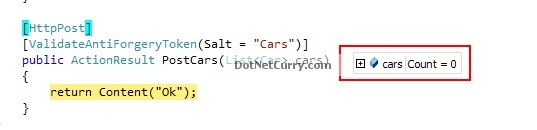
The action's parameter is a generic list of Car objects. If you post the data using a multi select HTML control, the default model binding won't work as expected.
image_1
The model binder doesn’t know how to bind the incoming values to a generic list of cars. This is where you can create a custom model binder to do this for you. To create a custom model binder, all that’s required is a class that inherits the IModelBinder interface. From there you implement the BindModel method. Here’s the code below:
public class SelectListModelBinder : IModelBinder
{
        public object BindModel(ControllerContext controllerContext, ModelBindingContext bindingContext)
        {
            // Get the raw attempted value from the value provider
            var incomingData = bindingContext.ValueProvider.GetValue("cars").AttemptedValue;
            return incomingData.Split(new char[1] { ',' }).Select(data => Car.GetCars().FirstOrDefault(o => o.Id == int.Parse(data))).ToList();
        }
}
The incoming data can be viewed thanks to the binding context parameter:
var incomingData = bindingContext.ValueProvider.GetValue("cars").AttemptedValue;
The cars values is being passed into the action through the Request.Forms["cars"] value. From there I return a Car object populated with the values from incoming data. Nice and easy.
To use this function I can either register the model binder in the global.asax file, which means it will available to any action that accept a list of cars:
protected void Application_Start()
{
      AreaRegistration.RegisterAllAreas();
       ModelBinders.Binders.Add(typeof (List<Car>), new SelectListModelBinder());
       RegisterRoutes(RouteTable.Routes);
}
If I wanted to target particular actions, I can prefix the model binder to the parameter:
public ActionResult PostCars([ModelBinder(typeof(SelectListModelBinder))] List<Car> cars)
{
      return Content("Ok");
}
Model binding is a powerful feature in ASP.NET MVC and it can help you out in sticky situations.
All the demo related with mvc please click here


Source of this post:http://www.dotnetcurry.com/showarticle.aspx?ID=584

Thursday, January 9, 2014

Bind dropdownlist with data from json using MVC razor

Controller:

 [HttpPost]
        public JsonResult GetStateList()
        {
            var list = new List<System.Web.UI.WebControls.ListItem>() {
            new System.Web.UI.WebControls.ListItem() { Value = "1", Text = "bhopal" },
            new System.Web.UI.WebControls.ListItem() { Value = "2", Text = "Indore" },
            new System.Web.UI.WebControls.ListItem() { Value = "3", Text = "Jablpur" }
         };
            return Json(list);
        }


View:

        $.ajax({
            type: "POST",
            url: "ControllerName/GetStateList",
           contentType: "json",
           dataType: "json",
           success: function (data) {
              var ddlCountrylist=$('#Claims1');//Dropdown List Id
               var items = data;             
               $(items).each(function (index, optionText) {
                                                      $('<option value=' + optionText.Value + '>' + optionText.Text + '</option>').appendTo(ddlCountrylist);
               });              
                           },
            error: function (xhr) {
                alert(xhr.responseText);
            }
        });

Wednesday, October 23, 2013

Null coalescing operator

Null coalescing
          x ?? y
Evaluates to y if x is null, to x otherwise

Thursday, September 26, 2013

Dependency Injection

Dependency Injection (DI) is a software design pattern that allow us to develop loosely coupled code. DI is a great way to reduce tight coupling between software components. DI also enables us to better manage future changes and other complexity in our software. The purpose of DI is to make code maintainable.
The Dependency Injection pattern uses a builder object to initialize objects and provide the required dependencies to the object means it allows you to "inject" a dependency from outside the class. 


For example, Suppose your Client class needs to use a Service class component, then the best you can do is to make your Client class aware of an IService interface rather than a Service class. In this way, you can change the implementation of the Service class at any time (and for how many times you want) without breaking the host code.


We have following different ways to implement DI :

Constructor Injection

  1. This is the most common DI.
  2. Dependency Injection is done by supplying the DEPENDENCY through the class’s constructor when instantiating that class.
  3. Injected component can be used anywhere within the class.
  4. Should be used when the injected dependency is required for the class to function.
  5. It addresses the most common scenario where a class requires one or more dependencies.
  1. public interface IService
  2. {
  3. void Serve();
  4. }
  5. public class Service : IService
  6. {
  7. public void Serve()
  8. {
  9. Console.WriteLine("Service Called");
  10. //To Do: Some Stuff
  11. }
  12. }
  13. public class Client
  14. {
  15. private IService _service;
  16. public Client(IService service)
  17. {
  18. this._service = service;
  19. }
  20. public void Start()
  21. {
  22. Console.WriteLine("Service Started");
  23. this._service.Serve();
  24. //To Do: Some Stuff
  25. }
  26. }
  27. class Program
  28. {
  29. static void Main(string[] args)
  30. {
  31. client = new Client(new Service());
  32. client.Start();
  33. Console.ReadKey();
  34. }
  35. }
  36.  
  37.  
The Injection happens in the constructor, by passing the Service that implements the IService-Interface. The dependencies are assembled by a "Builder" and Builder responsibilities are as follows:
  1. knowing the types of each IService
  2. according to the request, feed the abstract IService to the Client

Property injection

  1. Also called Setter injection.
  2. Used when a class has optional dependencies, or where the implementations may need to be swapped. Different logger implementations could be used this way.
  3. May require checking for a provided implementation throughout the class(need to check for null before using it).
  4. Does not require adding or modifying constructors.
  1. public interface IService
  2. {
  3. void Serve();
  4. }
  5.  
  6. public class Service : IService
  7. {
  8. public void Serve()
  9. {
  10. Console.WriteLine("Service Called");
  11. //To Do: Some Stuff
  12. }
  13. }
  14.  
  15. public class Client
  16. {
  17. private IService _service;
  18.  
  19. public IService Service
  20. {
  21. set
  22. {
  23. this._service = value;
  24. }
  25. }
  26.  
  27. public void Start()
  28. {
  29. Console.WriteLine("Service Started");
  30. this._service.Serve();
  31. //To Do: Some Stuff
  32. }
  33. }
  34. class Program
  35. {
  36. static void Main(string[] args)
  37. {
  38. Client client = new Client();
  39. client.Service = new Service();
  40. client.Start();
  41.  
  42. Console.ReadKey();
  43. }
  44. }

Method injection

  1. Inject the dependency into a single method, for use by that method.
  2. Could be useful where the whole class does not need the dependency, just the one method.
  3. Generally uncommon, usually used for edge cases.
  1. public interface IService
  2. {
  3. void Serve();
  4. }
  5.  
  6. public class Service : IService
  7. {
  8. public void Serve()
  9. {
  10. Console.WriteLine("Service Called");
  11. //To Do: Some Stuff
  12. }
  13. }
  14.  
  15. public class Client
  16. {
  17. private IService _service;
  18.  
  19. public void Start(IService service)
  20. {
  21. this._service = service;
  22. Console.WriteLine("Service Started");
  23. this._service.Serve();
  24. //To Do: Some Stuff
  25. }
  26. }
  27. class Program
  28. {
  29. static void Main(string[] args)
  30. {
  31. Client client = new Client();
  32. client.Start(new Service());
  33.  
  34. Console.ReadKey();
  35. }
  36. }
  37.  
  38.  

Key points about DI

  1. Reduces class coupling
  2. Increases code reusing
  3. Improves code maintainability
  4. Improves application testing